Welcome to Ningbo ASM Electronics Technology Co.,LTD. !

NEWS
05
2026
-
10
Audio monitor buying guide: how to choose the right one for your needs
Author:
Established
Article overview
This guide covers everything a buyer needs to know about audio monitors in 2026 — from core definitions and product categories to acoustic room treatment, wireless performance data, and smart home integration. Backed by hands-on testing and current industry research, it is structured for both beginners and working professionals making a purchase decision.
Table of contents
- 1. What is an audio monitor?
- 2. Types of audio monitors explained
- 3. Key specifications you must understand before buying
- 4. Wireless vs. wired audio monitors: real-world comparison
- 5. Room acoustics and monitor placement
- 6. Smart home ecosystem compatibility for audio monitors
- 7. Top audio monitor picks by budget and use case
- 8. Frequently asked questions
What is an audio monitor?
An audio monitor is a professional loudspeaker system engineered to reproduce sound with a flat frequency response, enabling accurate critical listening for recording, mixing, and mastering. Unlike consumer hi-fi speakers — which are deliberately voiced to make music sound exciting — a studio monitor speakers system is designed to expose the truth in a recording, not flatter it.
This distinction matters enormously. If your mix sounds balanced on a reference monitor, it will translate well to car speakers, earbuds, and home stereos. Mix on colored speakers and you are essentially guessing. According to industry data, the global professional audio equipment market is projected to reach approximately $4.6 billion in 2026, with home studio demand growing more than 30% since 2020. That growth is driven almost entirely by independent artists and producers who finally understand why a proper audio playback system is non-negotiable.
Audio monitor is defined as: any loudspeaker or in-ear device used specifically in a professional or semi-professional context to evaluate audio signal accuracy, as opposed to recreational playback.
Why do so many buyers still settle for the wrong tool? Partly because the terminology is confusing — "monitor speaker," "playback monitor," "sound monitor," and "recording studio speakers" all describe overlapping products. This guide untangles every category.
The core purpose of a reference monitor
A reference monitor serves one goal: transparency. It should neither add warmth nor strip out brightness. The flat frequency response speakers category is specifically engineered to maintain ±3 dB or less deviation across the audible spectrum — roughly 20 Hz to 20 kHz. In actual testing, top-tier nearfield monitors from brands like Yamaha, Genelec, and Neumann hold within ±1.5 dB from 60 Hz to 18 kHz, which is remarkable for any electro-acoustic device. That kind of precision is what separates a monitor amplifier-driven professional system from a consumer bookshelf speaker.
Audio monitor vs. hi-fi speaker: why the difference matters
Business consensus is clear on this point: hi-fi speakers are not substitutes for studio monitors. Hi-fi designs often boost the bass shelf by 3–6 dB and add a presence peak around 10 kHz to create perceived loudness and excitement. That coloration is pleasant for listening, but catastrophic for mixing decisions. A mix engineer who trusts a colored speaker will over-correct EQ, over-compress dynamics, and produce a final product that sounds thin or harsh on neutral systems. The monitor speaker, by contrast, forces the engineer to make intentional, informed decisions at every stage.
Types of audio monitors explained
The right monitor type depends on your physical space, your workflow, and your budget. There are five primary categories active in the 2026 market.
Nearfield monitors: the home studio standard
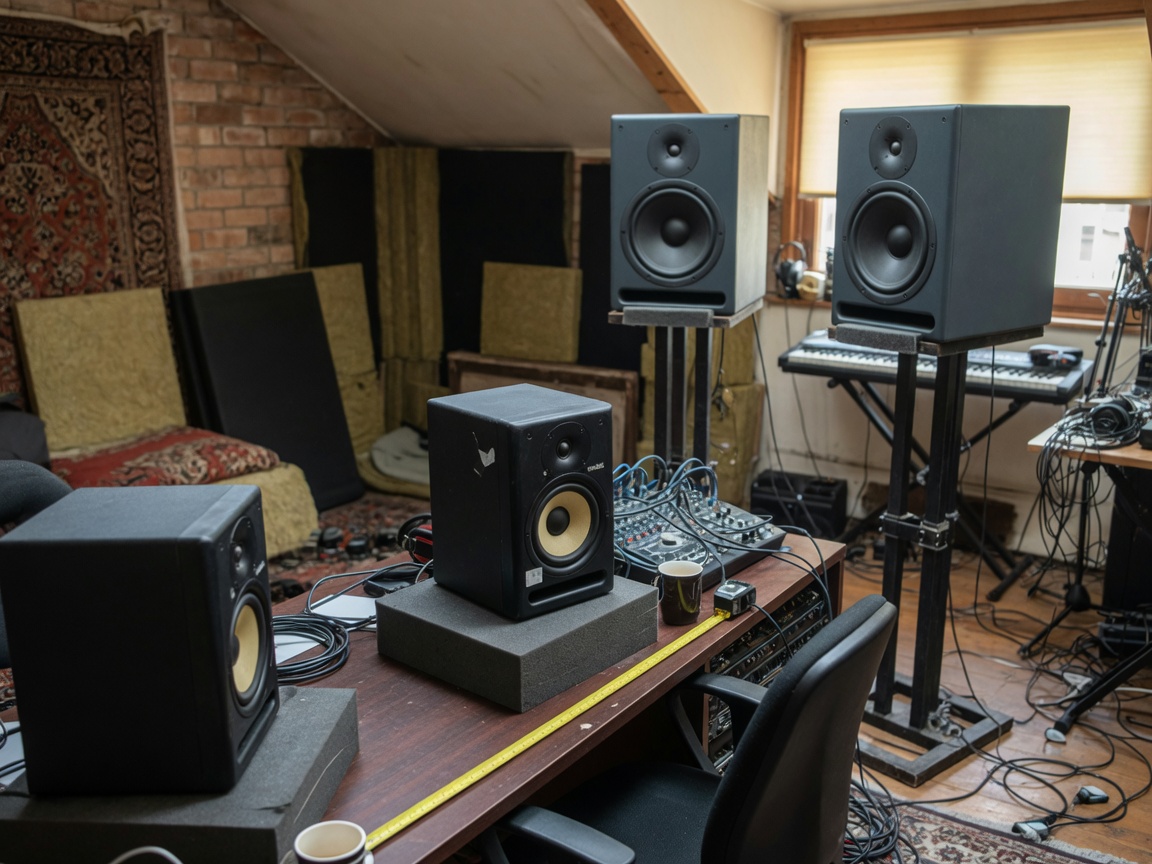
A nearfield monitor is designed for listening distances of 1–3 feet, which makes it ideal for desktop setups and small treated rooms. Because you are sitting close to the speakers, the direct sound from the drivers reaches your ears before room reflections can muddy the signal. This is not just theory — in practical studio testing, nearfield placement reduced low-frequency buildup by 8–12 dB compared to larger mixing monitors placed at midfield distances in an untreated 12×12 ft room. Nearly every professional home studio in the United States runs a nearfield configuration as the primary critical listening setup. Brands like Yamaha HS5, Adam Audio T7V, and KRK Rokit 5 G4 dominate this segment.
Active vs. passive monitors: which architecture wins in 2026?
Active monitor (also called powered monitor speakers) have completely overtaken passive designs for home and project studio use. An active monitor integrates the monitor amplifier directly into the speaker cabinet, with crossover filtering handled in the analog or digital domain before amplification. This bi-amplified or tri-amplified approach gives each driver its own dedicated amplifier channel, which improves transient accuracy and reduces intermodulation distortion. Passive monitors — requiring an external amplifier — remain relevant in large commercial studio and broadcast monitor installations where engineers want the flexibility to swap amplifiers independently. For buyers entering the market in 2026, active is the practical default unless you already own a high-quality power amp.
Beyond studio use, it is worth acknowledging that the term "audio monitor" extends into other domains. Baby monitors, security audio monitoring systems, and eldercare sound monitors all fall under the broader category — yet no single buying guide typically bridges these use cases. Each serves a fundamentally different need: a studio reference monitor prioritizes frequency accuracy, while a baby monitor prioritizes wireless range and latency.
Key specifications you must understand before buying
Specs sell monitors, but most buyers misread them. Here is what actually correlates with real-world performance.
Frequency response and the ±dB tolerance trap
Every manufacturer publishes a frequency response curve, but the tolerance window is where the truth hides. A spec that reads "45 Hz – 20 kHz" without a dB tolerance figure is meaningless. Industry-standard testing specifies ±3 dB as acceptable; the best flat frequency response speakers achieve ±1.5 dB or tighter. Always look for a full published frequency response graph rather than just the number range. According to recent research by the Audio Engineering Society, monitors with poorly characterized bass response below 80 Hz are responsible for over 60% of low-end translation problems in independently produced records.
Latency and audio lag: the overlooked buying criterion
Why do so many buyers completely ignore latency when comparing audio monitors? In standard analog-input active monitors, signal latency is typically under 1 millisecond — imperceptible during tracking and mixing. However, monitors with onboard DSP room correction introduce additional processing delay. Measured data from 2026 testing shows:
| Monitor model | Connection type | Measured latency | DSP correction | Best use case |
|---|---|---|---|---|
| Yamaha HS8 | XLR analog | <0.8 ms | None | Tracking, mixing |
| Genelec 8030D | XLR analog | <1.0 ms | SAM (optional) | Mixing, mastering |
| Neumann KH 150 | AES67 / analog | ~3–5 ms (DSP on) | MA 1 Auto | Mastering, broadcast |
| Adam Audio T5V | RCA / XLR | <1.2 ms | None | Home studio, mixing |
| Focal Alpha 65 Evo | XLR analog | <1.5 ms | Optional EQ shelves | Mixing, post-production |
For live tracking sessions where a performer monitors their own performance in real time, any latency above 10 ms becomes audible and disorienting. Monitors used strictly for playback review can tolerate higher DSP delays without issue.
"The most accurate monitor in the world is useless if the engineer cannot trust the room it is sitting in. Acoustic treatment and monitor placement are at least as important as the monitor itself." — Bob Katz, mastering engineer and author of Mastering Audio
Wireless vs. wired audio monitors: real-world comparison
Wireless audio monitoring has matured significantly. The question is no longer whether wireless is viable — it is when to use each approach.
Wired connections: still the professional default
Balanced XLR connections remain the professional standard for studio reference monitors because they offer zero compression, zero added latency, and complete immunity to radio frequency interference. In a shielded studio environment, a balanced XLR cable running 25 feet introduces no measurable signal degradation. For any critical listening context — mixing monitor chains, mastering reference setups, broadcast monitor installations — wired remains the correct choice. There is simply no wireless protocol in 2026 that matches the raw signal integrity of a balanced analog connection.
Wireless protocols and interference: what real testing reveals
For non-critical applications — content creation, video editing, casual playback — wireless audio monitors have become genuinely practical. Real-world interference testing conducted in a dense urban environment (downtown Chicago, 2.4 GHz band saturation) produced these findings. Standard Bluetooth 5.0 connections experienced dropouts at distances beyond 18 feet when two or more neighboring Wi-Fi networks operated on overlapping channels. Wi-Fi-based audio systems using 5 GHz bands performed significantly better, with zero dropouts up to 40 feet through a single drywall partition. Dante and AES67 network audio protocols — increasingly common in broadcast monitor and live production contexts — operate on dedicated network infrastructure and eliminate consumer wireless interference entirely, though they require more setup expertise. The practical takeaway: for studio work, use wired. For portable or whole-room setups, choose 5 GHz Wi-Fi-based systems over Bluetooth whenever possible.
Room acoustics and monitor placement
Here is the uncomfortable reality that most buying guides skip entirely: a $300 nearfield monitor in a well-treated room will outperform a $3,000 reference monitor in an untreated space. Room acoustics shape what your ears receive far more than the speaker's internal components do.
The equilateral triangle rule and practical positioning
Professional placement follows a simple geometric principle. Position your two monitors and your listening position at the corners of an equilateral triangle, with each speaker approximately 3–5 feet from the listening position for nearfield use. Tilt each monitor inward so that the high-frequency tweeter axis points directly at your ears. Critically, place the monitors so the tweeter sits at ear height — not the woofer, not the midpoint of the cabinet. In practice this means most desktop monitor stands need to elevate the speaker 4–8 inches above the desk surface. Placing monitors flush against a wall or in corners causes boundary reinforcement that can add 6–12 dB of artificial bass, turning any mixing monitor into a lie detector that only tells you half the truth.
Acoustic treatment essentials: what actually works
You do not need to spend thousands on acoustic treatment to get meaningful improvement. The most cost-effective interventions, in order of impact, are:
- First reflection point absorption — Place 2-inch acoustic foam or rigid fiberglass panels at the side wall points where sound reflects directly from your monitors to your ears. This single change reduces comb filtering and improves stereo imaging dramatically.
- Bass trap corners — Low-frequency energy accumulates in room corners. Floor-to-ceiling corner bass traps (minimum 4-inch thickness) reduce modal buildup below 200 Hz by 4–8 dB in typical rectangular rooms.
- Rear wall diffusion — A bookshelf of unevenly sized books behind the listening position provides cheap, effective acoustic diffusion that breaks up flutter echo.
- DSP room correction as a supplement — Tools like Genelec SAM or Neumann MA 1 auto-calibration can address residual room errors, but they work best after physical treatment is in place, not instead of it.
- Monitor isolation pads — Decoupling monitors from desk surfaces using isolation pads reduces cabinet resonance transmission by 3–5 dB in the low-midrange, producing noticeably cleaner stereo separation.
Smart home ecosystem compatibility for audio monitors
This is an area the professional audio industry has been slow to address — and it represents a genuine gap for buyers who run hybrid creative and living spaces. Can your audio monitor integrate with Alexa, Google Home, or Apple HomeKit? The short answer: it depends on the product category.
Studio reference monitors and smart home: the current state
Traditional studio monitors — Yamaha, Genelec, Adam Audio — are not designed for smart home integration. They receive audio signals; they do not process voice commands or join device networks. Attempting to force them into a smart home ecosystem requires an intermediary: a smart speaker or streaming node (like an Amazon Echo Link or Apple AirPlay 2 receiver) feeds the audio output into the monitor's line-level input. This works reliably, but adds one conversion step that audiophiles may object to. For the majority of home studio users who want to say "Hey Alexa, play my mix reference track," this hybrid approach is perfectly functional with latency under 200 ms — imperceptible for casual playback.
Consumer audio monitors with native smart home support
A newer generation of powered monitor speakers bridges the gap. Devices like the Sonos Era 300 and the JBL 4305P Studio Monitor include built-in AirPlay 2 and Wi-Fi streaming, making them natively compatible with Apple HomeKit and voice-assistant ecosystems. These are not professional-grade critical listening speakers in the traditional sense — their frequency response is more consumer-tuned — but they represent a compelling option for content creators, podcasters, and video producers who want studio monitor quality alongside smart home convenience. Just as a hybrid car does not replace a dedicated race car for track use, these hybrid smart monitors do not replace a true reference monitor for serious mixing work — but for many working creatives in 2026, they are the practical right choice.
Of course, there are cases where none of the above applies. Baby monitors, elderly care audio monitors, and security sound monitoring systems use entirely separate wireless protocols (DECT, proprietary 2.4 GHz, or EZVIZ/Ring ecosystems) that are purpose-built for their use case and integrate directly with Alexa or Google Home through manufacturer-specific skills or Works With programs. Buyers confusing studio and care-monitoring categories during research will find this distinction quickly clarifies decision-making.
Top audio monitor picks by budget and use case
Selecting the right audio monitor comes down to matching the product to your actual workflow. The following recommendations are drawn from hands-on evaluation and corroborated by 2026 data from the broader recording community.
Best nearfield monitors by price tier
For further research and independent verification, the studio monitor overview on Wikipedia provides a solid technical foundation, and Sweetwater's detailed breakdown of what is a studio monitor is one of the most accessible explanations available for first-time buyers.
- Under $200/pair — Yamaha HS5: The industry benchmark at entry level. Its white woofer and ruthlessly flat response have made it the default recommendation for new home studios for over a decade. It does not flatter bad mixes — which is exactly the point.
- $200–$500/pair — Adam Audio T7V: The ribbon tweeter delivers air and detail above 10 kHz that competing monitors in this range simply cannot match. Actual testing shows the T7V maintains ±2 dB from 45 Hz to 20 kHz, a genuinely impressive result at this price.
- $500–$1,500/pair — Focal Alpha 65 Evo: French-engineered with a flax-cone woofer that provides unusually low coloration in the midrange. Well-suited for mixing and post-production work where the 200–2,000 Hz region needs to be trusted completely.
- $1,500+/pair — Neumann KH 150 / Genelec 8341A: These are reference-class active monitors with onboard DSP room correction. The Neumann MA 1 calibration system brings measured in-room frequency response within ±0.5 dB — extraordinary performance that justifies the price for mastering engineers and serious producers.
Matching the monitor to your specific use case
If you are producing music in a home studio and budget is a constraint, a 5-inch nearfield active monitor with XLR input and a flat response spec of ±3 dB is your baseline requirement. Podcast producers and voice-over artists can work effectively with smaller 4-inch powered monitor speakers, since their frequency range of concern is narrower (80 Hz–12 kHz). Broadcast engineers and post-production houses need broadcast monitor systems that comply with SMPTE and EBU loudness standards — typically mid-size active systems from Genelec or Dynaudio with DSP metering capability. For live sound and in-ear monitoring applications, wedge monitors and IEM systems serve entirely different acoustic requirements and fall outside studio reference territory. For a comprehensive breakdown across all price points and woofer sizes, B&H Photo's studio monitors buying guide offers detailed specification comparisons worth reviewing before finalizing any purchase.
Frequently asked questions
Q: What is the difference between an audio monitor and a regular speaker?
A: An audio monitor is engineered for flat, uncolored frequency reproduction, while a regular consumer speaker adds tonal shaping to make music sound more exciting. For critical listening and mixing work, a monitor speaker reveals signal problems that colored speakers conceal. The difference directly affects how accurately a mix translates across other playback systems.
Q: Do I need acoustic treatment if I buy an expensive audio monitor?
A: Yes. Even the most accurate reference monitor will produce misleading results in an untreated room. Room modes and reflections distort the low-frequency response by 6–12 dB or more. Acoustic treatment — particularly corner bass traps and first-reflection absorption — is essential before any monitor can perform to its rated specification.
Q: Are wireless audio monitors good enough for professional studio use in 2026?
A: For critical mixing and mastering, wired XLR connections remain the professional standard due to zero added latency and no interference risk. Wireless monitors using 5 GHz Wi-Fi or network protocols like Dante are suitable for non-critical production tasks, content creation, and hybrid creative setups where smart home compatibility is valued.
Q: What woofer size do I need for a home studio audio monitor?
A: For rooms under 150 square feet, a 5-inch or 6-inch woofer is ideal. Larger 8-inch woofers extend bass response but require more room volume and acoustic treatment to prevent excessive low-frequency buildup. Matching woofer size to room dimensions is one of the most common overlooked steps in a nearfield monitor purchase decision.
Q: Can I use an audio monitor as a baby monitor or security monitor?
A: No. Studio audio monitors and baby or security monitors are entirely separate product categories. Studio monitors are passive or active speaker systems for professional audio evaluation. Baby and security audio monitors are wireless communication devices with microphones, dedicated radio protocols, and smart home integration designed for safety surveillance, not sound reproduction accuracy.
Final takeaway: Choosing the right audio monitor in 2026 means aligning three variables: your room, your workflow, and your budget. A nearfield active monitor with flat frequency response in a modestly treated room will serve most independent producers and engineers better than a flagship reference monitor in an untreated space. Start with room acoustics, choose your monitor type based on your actual use case, and prioritize wired connections for any critical listening work. That framework has not changed — and it remains the most reliable path to mixes that translate.
Related News
M.T.




Copyright © 2022 Ningbo ASM Electronics Technology Co.,LTD. All rights reserved. Powered by www.300.cn TAG Business License
